Purpose
Signed Distance Field (SDF) is a technique for rendering fonts at a consistent quality regardless of scale.
With the default (sprite) rendering path, every glyph is rasterized once into the texture atlas as a bitmap that stores the coverage of the glyph outline (the alpha value of every pixel). When such a bitmap is drawn at a size other than the one it was rasterized for, the edges are simply stretched by the GPU and quickly become blurry or pixelated.
SDF rendering changes what is stored in the atlas. Instead of per-pixel alpha coverage, each texel stores the signed distance to the glyph outline — a value that is negative inside the glyph, positive outside it, and close to zero near the outline. At draw time, a fragment shader converts this distance back into alpha (by thresholding it against the pixel's location relative to the outline). Because the inside/outside transition is recomputed per-pixel as the text is scaled, the edges of the glyph stay crisp at any scale, and effects such as shadows are computed from the same distance data.
Enabling SDF Rasterization
SDF is enabled per FontSystem by setting FontSystemSettings.FontRasterizationMode to FontRasterizationMode.SDF:
var settings = new FontSystemSettings
{
	FontRasterizationMode = FontRasterizationMode.SDF
};
var fontSystem = new FontSystem(settings);
Enabling SDF For All FontSystems
To enable SDF for every FontSystem created afterwards, set the default once before creating any FontSystem:
FontSystemDefaults.FontRasterizationMode = FontRasterizationMode.SDF;
Rendering With SDFTextBatch
Because the atlas now contains distance data instead of colors, the regular SpriteBatch.DrawString extension methods would render it incorrectly. The SDFTextBatch class (available in the MonoGame and FNA packages) applies the SDF effect and draws the text:
// Create once (typically in LoadContent)
_sdfTextBatch = new SDFTextBatch(GraphicsDevice);

// Create a font from the SDF-enabled FontSystem
SpriteFontBase font = _fontSystem.GetFont(64);

// Draw as many strings as needed between Begin/End
_sdfTextBatch.Begin();
_sdfTextBatch.DrawString(font, "Hello, SDF!", new Vector2(10, 10), Color.White);
_sdfTextBatch.DrawString(font, "Scaled up", new Vector2(10, 80), Color.Yellow, scale: new Vector2(4.0f));
_sdfTextBatch.End();
The scale parameter of DrawString is the primary way to resize SDF text — even large scale factors keep the edges sharp. Call Dispose() when the batch is no longer needed.
Font Effects (Shadow & Stroke)
Shadow and stroke effects are applied to individual strings via the DrawShadowString and DrawStrokeString methods. Each call specifies its own effect parameters:
_sdfTextBatch.Begin();

// Plain text
_sdfTextBatch.DrawString(font, "No effect", new Vector2(10, 10), Color.White);

// Shadow: casts a colored shadow offset by the given distance (in pixels)
_sdfTextBatch.DrawShadowString(font, "Drop shadow", new Vector2(10, 60), Color.White,
	Color.Black, 2, 2);

// Outline (stroke): draws a colored outline around the glyphs.
// thickness and smoothness are expressed in normalized SDF-space units
// (typical values are around 0.5 and 0.05 respectively).
_sdfTextBatch.DrawStrokeString(font, "Outlined", new Vector2(10, 110), Color.White,
	Color.Black, 0.5f, 0.05f);

_sdfTextBatch.End();
FixedSDFFontSize
FixedSDFFontSize is for saving texture space. Instead of rasterizing a separate SDF glyph bitmap for every requested size, it rasterizes glyphs once at a fixed size and reuses that same distance field for all sizes (via a ScaledSpriteFont scaled to fontSize / FixedSDFFontSize). This avoids storing many duplicate glyph bitmaps in the atlas.
var settings = new FontSystemSettings
{
	FontRasterizationMode = FontRasterizationMode.SDF,
	FixedSDFFontSize = 64
};
var fontSystem = new FontSystem(settings);
It can also be set globally for all font systems:
FontSystemDefaults.FixedSDFFontSize = 64;
When FixedSDFFontSize is left unset (null), the font is rasterized directly at the requested size instead.
The default value is 64.
SDF Supersampling (SDFTextBatch)
SDFTextBatch.Supersampling controls whether supersampling is applied when rendering SDF glyphs. When enabled (the default), the SDF shader applies supersampled edges for smoother outlines.
_sdfTextBatch.Supersampling = true;
The default value is true.
Disabling it may improve rendering performance, but can lead to rendering artefacts, such as "holes" appearing in the glyphs.
Sample
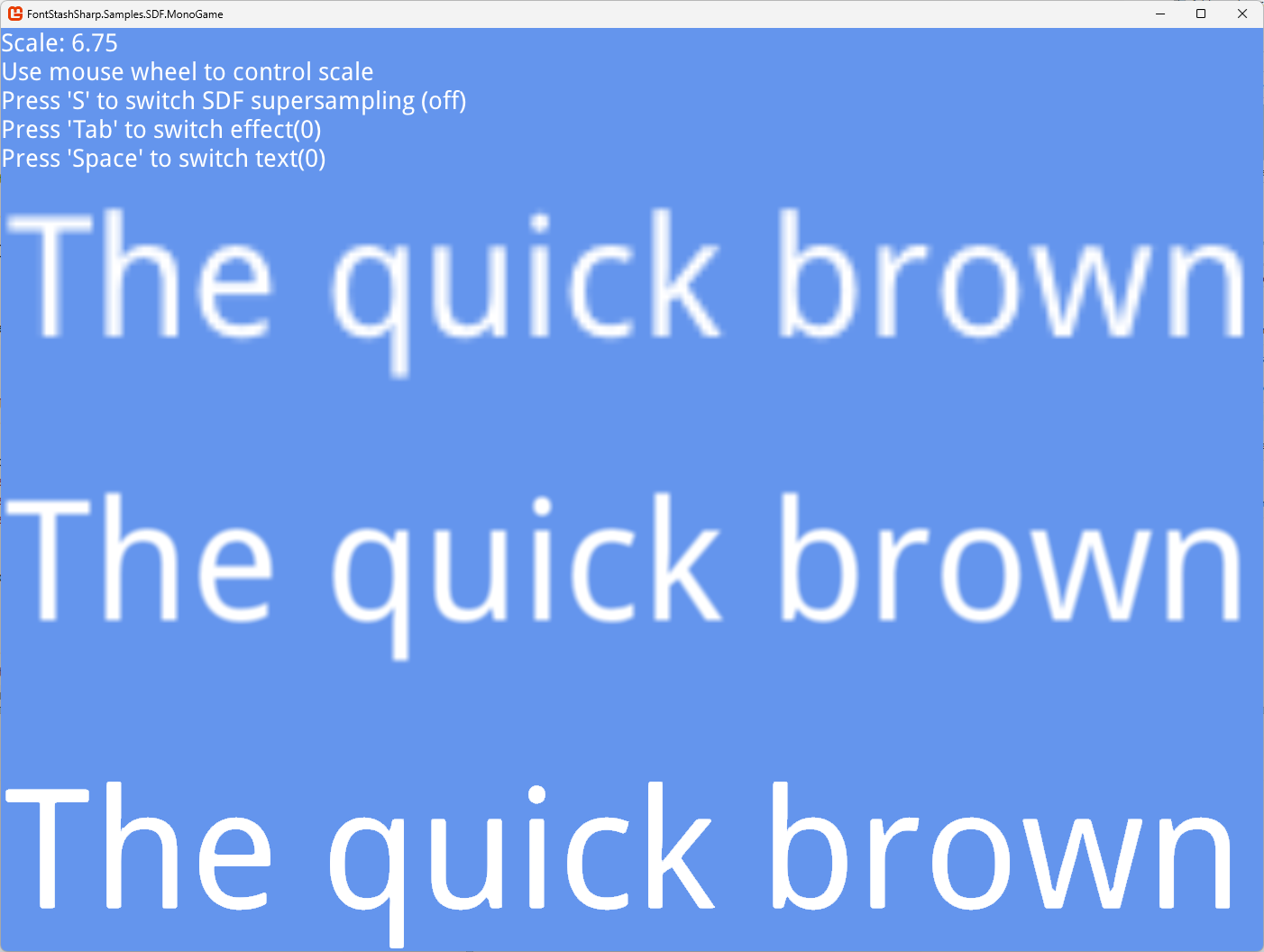
The FontStashSharp.Samples.SDF sample renders the same text with 3 methods so they can be compared at any scale (the scale is controlled with the mouse wheel):
- top — ordinary rendering
- middle — supersampling (with
FontResolutionFactorset to 4) - bottom — SDF (with
FixedSDFFontSizeset to 64)