Basic Usage
FontStashSharp supports simple rich text functionality through special class RichTextLayout.
The following code demonstrates its basic usage with text that has one simple command '/n' (line break):
RichTextLayout rtl = new RichTextLayout
{
  Font = fontSystem.GetFont(32), // fontSystem is default Arial
  Text = "First line./nSecond line.",
};
Now it can be rendered using the following code:
rtl.Draw(_spriteBatch, position, Color.White);
Which would result in this:

Use property RichTextLayout.Size to find out the size in pixels of the rendered rich text.
Commands
The following chapter lists all supported commands. Later chapters will describe each in detail.
| Name | Description | Examples |
|---|---|---|
| // | Symbol '/' | |
| /c[color] | Changes the current color | /c[red] or /c[#ff123456] |
| /cd | Changes the current color back to default(one that is passed to the RichTextLayout.Draw method) | |
| /eb[_effectAmount] * | Turns on the blurry text effect. If the amount parameter is omitted, the effect amount is set to 1 by default. | /eb or /eb2 or /eb[2] |
| /es[_effectAmount] * | Turns on the stroked text effect. If the amount parameter is omitted, the effect amount is set to 1 by default. | /es or /es2 or /es[2] |
| /ed * | Turns off the text effect | |
| /f[fontString] | Changes the current font | /f[arialbd.ttf,32] |
| /fd | Changes the current font to default(RichTextLayout.Font) | |
| /i[imageString] | Inserts an image | /i[image.png] |
| /n | Line break | |
| /s[size] | Insert a space with size specified in pixels | /s100 or /s[100] |
| /tu | Sets text style to underline | |
| /ts | Sets text style to strikethrough | |
| /td | Sets text style to default | |
| /v[offset] | Sets the vertical offset in pixels | /v-10 or /v[-10] |
| /vd | Sets the vertical offset to zero | |
| /ds[color] ** | Turns on the SDF shadow effect. The shadow offset is taken from RichTextDefaults.SDFShadowOffset. If a color is not specified, it is taken from RichTextDefaults.SDFShadowColor. | /ds or /ds[blue] or /ds[#000000] |
| /dt[color] ** | Turns on the SDF stroke effect. The thickness and smoothness are taken from RichTextDefaults.SDFStrokeThickness and RichTextDefaults.SDFStrokeSmoothness. If a color is not specified, it is taken from RichTextDefaults.SDFStrokeColor. | /dt or /dt[white] or /dt[#ffffff] |
| /dd ** | Turns off the SDF effect, switching back to plain text. |
* -- Available only with standard rasterization (FontRasterizationMode.Standard). These commands are ignored when the text is rendered with SDF.
** -- Available only with SDF rasterization (FontRasterizationMode.SDF). These commands are ignored when the text is rendered with standard rasterization.
The commands without a marker are available in both rendering modes.
Commands '/c' and '/cd'
Command '/c[color]' changes the current color. The 'color' can be either a color name or its hex code (in RGB or RGBA format). In that case, it should be preceded by the '#' symbol.
Command '/cd' changes the color back to the default, one that is passed to the RichTextLayout.Draw method.
For example, if we pass the following text to RichTextLayout:
This is /c[red]colored /c[#00f0fa]ext, /cdcolor could be set either /c[lightGreen]by name or /c[#fa9000ff]by hex code.
It would render the following (if the default color passed to RichTextLayout.Draw is white):

Commands '/f' and '/fd'
Command '/f[fontString]' changes the current font. The 'fontString' argument should be parsed by the developer. This is achieved by implementing a handler function that accepts a string argument and returns a value of type SpriteFontBase. The function should be assigned to the static property RichTextDefaults.FontResolver.
For example, the following code implements the font resolver—which parses the font file name and size separated by a comma—and creates the font from "C:\Windows\Fonts":
RichTextDefaults.FontResolver = p =>
{
        // Parse font name and size
	var args = p.Split(',');
	var fontName = args[0].Trim();
	var fontSize = int.Parse(args[1].Trim());

	// _fontCache is field of type Dictionary<string, FontSystem>
	// It is used to cache fonts
	FontSystem fontSystem;
	if (!_fontCache.TryGetValue(fontName, out fontSystem))
	{
                // Load and cache the font system
		fontSystem = new FontSystem();
		fontSystem.AddFont(File.ReadAllBytes(Path.Combine(@"C:\Windows\Fonts", fontName)));
		_fontCache[fontName] = fontSystem;
	}

        // Return the required font
	return fontSystem.GetFont(fontSize);
};
Now if we pass the following text to RichTextLayout:
Text in default font./n/f[arialbd.ttf, 24]Bold and smaller font. /f[ariali.ttf, 48]Italic and larger font./n/fdBack to the default font.
It would render following:

Commands '/v' and '/vd'
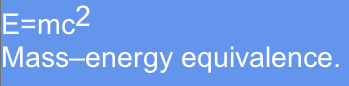
Command '/v[offset]' sets the vertical offset in pixels. Command '/vd' sets it back to zero.
If we pass the following text to RichTextLayout:
E=mc/v[-8]2/n/vdMass–energy equivalence.
It would render following:
Command '/i'
Command '/i[imageString]' inserts an image. Similarly to handling fonts, it's the developer responsibility to implement the image resolver function, which accepts string and returns object of type IRenderable. The function should be assigned to the static property RichTextDefaults.ImageResolver.
There's class TextureFragment that implements IRenderable by simply rendering fragment of the texture.
Hence the sample implementation of the image resolver could look like this:
RichTextDefaults.ImageResolver = p =>
{
	Texture2D texture;

	// _textureCache is field of type Dictionary<string, Texture2D>
	// it is used to cache textures
	if (!_textureCache.TryGetValue(p, out texture))
	{
		using (var stream = File.OpenRead(Path.Combine(@"D:\Temp\DCSSTiles\dngn\trees\", p)))
		{
			texture = Texture2D.FromStream(GraphicsDevice, stream);
		}

		_textureCache[p] = texture;
	}

	return new TextureFragment(texture);
};
Now if we pass the following text to RichTextLayout:
A small tree: /i[mangrove1.png]
It would render following:

Images take into account the '/v' command but ignore the '/c' command. Hence if we pass the following text:
A small /c[red]tree: /v8/i[mangrove1.png]
It would render this:

SDF Support
Rich text supports Signed Distance Field (SDF) rendering. First make sure the font is rasterized with SDF as described in Signed Distance Field (SDF) Text Rendering:
FontSystemDefaults.FontRasterizationMode = FontRasterizationMode.SDF;
Instead of the regular blur and stroke text effects, which are only available with standard rasterization, SDF text can be drawn with shadow and stroke effects that are computed from the same signed distance data. They are turned on with the commands '/ds' and '/dt', and turned off with '/dd'.
Each of the '/ds' and '/dt' commands accepts an optional color parameter in the same format as '/c' (a color name or a '#'-prefixed hex code). If the color is specified, it is used for the effect instead of the corresponding RichTextDefaults color, and it persists until it is changed or '/dd' resets the SDF effects. For example:
/ds[red]Red drop shadow /dt[#00ff00]Green stroke
Because SDF effects are not part of the text string itself, their parameters (besides the optional color) are read from the following static properties of RichTextDefaults:
- RichTextDefaults.SDFShadowColor - the color of the shadow
- RichTextDefaults.SDFShadowOffset - the offset of the shadow in pixels
- RichTextDefaults.SDFStrokeColor - the color of the stroke
- RichTextDefaults.SDFStrokeThickness - the thickness of the stroke
- RichTextDefaults.SDFStrokeSmoothness - the smoothness of the stroke edges
For example:
RichTextDefaults.SDFShadowColor = Color.Black;
RichTextDefaults.SDFShadowOffset = new Vector2(2, 2);

RichTextLayout rtl = new RichTextLayout
{
  Font = fontSystem.GetFont(32),
  Text = "Plain text. /dtStroked text. /dd/dsDrop shadow.",
};
Text rendered this way should be drawn with an SDF-capable renderer instead of SpriteBatch. The SDFTextBatch class implements the required ISDFTextRenderer interface:
_sdfTextBatch.Begin();
rtl.Draw(_sdfTextBatch, position, Color.White);
_sdfTextBatch.End();
Rendering a layout with an ISDFTextRenderer when its font does not use FontRasterizationMode.SDF throws InvalidOperationException. Likewise, rendering a standard layout (with SpriteBatch or IFontStashRenderer) through an SDF-capable renderer throws an exception.
Word Wrapping
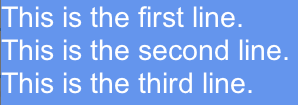
If you set RichTextLayout.Width to some value, then the text would be word-wrapped accordingly.
For example, if we pass the following text:
This is the first line. This is the second line. This is the third line.
And set RichTextLayout.Width to 300.
Following would be rendered:
Auto Ellipsis
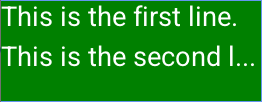
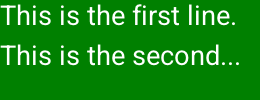
The ellipsis can be added to the end of the text if it doesn't fit the specified dimensions. This feature is used when both RichTextLayout.Width and RichTextLayout.Height are set. And RichTextLayout.AutoEllipsisMethod is set to either Word or Character. Also RichTextLayout.AutoEllipsisString determines the string to use as the ellipsis.
If in the above example we set Width to 250 and Height to 100. And AutoEllipsisMethod is set to Character, then the following would be rendered:
If AutoEllipsisMethod is set to Word, then following:
Sample
https://github.com/FontStashSharp/FontStashSharp/tree/main/samples/FontStashSharp.Samples.RichText
There's also an SDF version of this sample, which demonstrates rendering rich text with SDF shadow and stroke effects: https://github.com/FontStashSharp/FontStashSharp/tree/main/samples/FontStashSharp.Samples.RichText.SDF