Glyph rendering is the process that takes 8-bit output from the font rasterizer and converts it to a 32-bit RGBA glyph image. It is possible to control the glyph rendering using following FontSystemSettings properties:
- FontSystemSettings.GlyphRenderResult
- FontSystemSettings.GlyphRenderer
FontSystemSettings.GlyphRenderResult
This is enum that has following values:
  /// <summary>
  /// Determines how to produce final image(RGBA) from the rasterizer 8-bit source value
  /// </summary>
  public enum GlyphRenderResult
  {
    /// <summary>
    /// RGBA set to the source value. Default option
    /// </summary>
    Premultiplied,

    /// <summary>
    /// RGB set to 255 and A set to the source value
    /// </summary>
    NonPremultiplied,

    /// <summary>
    /// RGBA set to 255 if the source value is non-zero. Otherwise RGBA set to 0
    /// </summary>
    NoAntialiasing
  }
For example, the following code creates a FontSystem with disabled antialiasing (which is required for some pixel-perfect fonts):
  FontSystemSettings settings = new FontSystemSettings();
  settings.GlyphRenderResult = GlyphRenderResult.NoAntialiasing;
  FontSystem fontSystem = new FontSystem(settings);
The difference between default glyph rendering and disabled antialiasing is demonstrated in the image below. The top line shows default glyph rendering, and the bottom line shows the result using the above code:
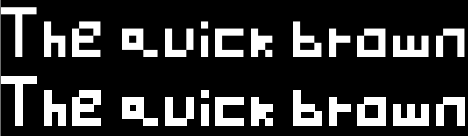
That is a screenshot from this sample: https://github.com/FontStashSharp/FontStashSharp/tree/main/samples/FontStashSharp.Samples.DisableAntialiasing
FontSystemSettings.GlyphRenderer
This is delegate with following definition:
public delegate void GlyphRenderer(byte[] input, byte[] output, GlyphRenderOptions options);
It allows to hack into the process of the glyph rendering to the texture atlas. It consists of 3 arguments:
- input is 8-bit byte buffer, generated by the glyph rasterizer, where every byte corresponds to the color/alpha of a pixel.
- output is 32-bit byte buffer that is build by the developer and allows to control final image of the glyph.
- options is various options such as glyph size or what effects are used.
The default implementation of GlyphRenderer is here: https://github.com/FontStashSharp/FontStashSharp/blob/8f976111096b77cf769c72fa61096381740d5489/src/FontStashSharp/GlyphRenderers.cs#L147
Following example code sets GlyphRenderer to custom implementation that disables the antialiasing(which is basically similar to setting GlyphRenderResult to GlyphRenderResult.NoAntialiasing):
  var settings = new FontSystemSettings();

  settings.GlyphRenderer = (input, output, options) =>
  {
    var size = options.Size.X * options.Size.Y;

    for (var i = 0; i < size; i++)
    {
      var c = input[i];
      var ci = i * 4;

      if (c == 0)
      {
        output[ci] = output[ci + 1] = output[ci + 2] = output[ci + 3] = 0;
      } else
      {
        output[ci] = output[ci + 1] = output[ci + 2] = output[ci + 3] = 255;
      }
    }
  };

  var result = new FontSystem(settings);